

Thinking about a wireless security camera in Prussia PA? Learn the real benefits, install ease, and what to expect from a professional setup.
Home security has come a long way. There was a time when adding cameras to a house meant drilling holes through every wall and running cables for days. The old wired systems worked, but the install alone made plenty of folks put off the project for years. Wireless cameras changed all that. The technology has gotten reliable, the picture quality has improved, and the install time has dropped from days to hours.
If you live in King of Prussia, you have probably noticed more neighbors adding cameras to their homes over the past few years. The reasons vary. Package theft. Car break-ins. Just wanting to know who is at the door without getting up. Whatever the reason, the demand has grown fast, and wireless systems have become the most popular pick for most homeowners. The team at Safe Protect has set up plenty of wireless systems across the Philadelphia suburbs, and we want to share what wireless cameras actually do well and where they fit best.
Why Wireless Has Taken Over
A wired camera system used to be the only real option. Now wireless setups handle almost everything wired systems can do, and they handle it without tearing up your walls. The biggest reason is the way wireless tech has improved. Modern wireless cameras send HD or 4K video over your home wifi or a dedicated radio link. Battery technology lasts months between charges. Some models run on small solar panels and never need a charge at all.
A 2024 report from the Consumer Technology Association showed that wireless security cameras now make up 72% of all new home camera sales in the U.S., up from just 41% in 2019. The shift happened fast because the tech finally caught up to what people actually want. Easy install, clear picture, and remote viewing from a phone.
Have you ever skipped a home upgrade because the install sounded like too much trouble? That used to be the story with cameras. Not anymore.
The Real Benefits Worth Knowing About
A wireless system gives you a lot of practical benefits that the old wired ones never could. Here are the ones that matter most to homeowners.
No Major Construction
The biggest win is the install itself. No drilling through brick. No cables running through the attic. No big patches in the drywall afterward. Most wireless cameras mount with a few screws into wall studs or soffits, then connect to your wifi in under five minutes. A full home setup that used to take two days now often gets done in an afternoon.
Easy Repositioning
With wired cameras, once you commit to a spot, that is the spot forever. Wireless cameras can be moved anytime. Maybe you realize the front porch cam picks up too much street noise. Move it to the side yard. Maybe you want a temporary camera while you are on vacation. Just stick it up. The flexibility matters more than people expect.
Renter-Friendly Setup
For folks who rent in King of Prussia, wireless cameras are often the only real option. Landlords usually do not let you drill through exterior walls or run cables through floors. Wireless cameras peel off and take with you when you move. No damage, no deposit issues, no permanent changes.
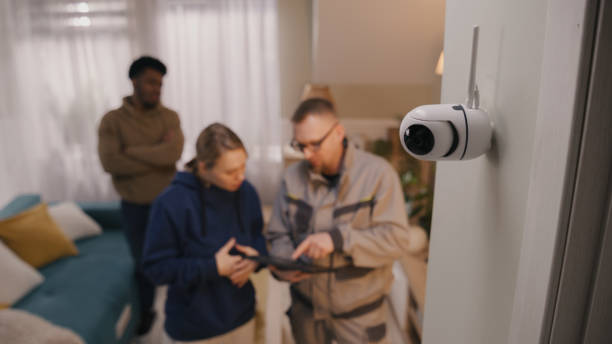
Smart Home Integration
Most modern wireless systems work with Alexa, Google Home, and Apple HomeKit. You can pull up the doorbell cam on your smart TV when someone rings the bell. You can ask Alexa to show you the backyard. You can set the cameras to record automatically when you leave the house, based on your phone’s location. The convenience adds up fast.
A Look at Common Wireless Camera Types
Different cameras work for different spots. Here is a side by side of the main options:
| Camera Type | Best For | Typical Cost | Power Source |
| Battery-powered outdoor | Areas without outlets | $130-$300 each | Rechargeable battery |
| Solar-powered outdoor | Sunny spots, hands-off | $180-$400 each | Solar panel, no charging |
| Plug-in wireless | Near outlets, full-time recording | $80-$200 each | Standard outlet |
| Doorbell camera | Front entry | $150-$300 each | Wired to doorbell circuit |
| Indoor wireless | Living areas, kids’ rooms | $50-$150 each | Plug-in or battery |
Most homes mix two or three types. A doorbell cam at the front, solar or battery cameras on the side and back, maybe an indoor camera near the kitchen.
Where Wireless Works Best in Prussia
King of Prussia has a mix of older homes and newer developments. Older homes often have thick walls, finished basements, and tricky cable routing. Wireless cameras work great in these because you skip all the drilling. Newer homes with structured wiring can go either way, but wireless still wins for most folks because of the flexibility.
The team that handles Best security cameras wireless outdoor in Prussia, PA can walk through your specific home and recommend which spots make sense for wireless versus a hybrid setup.
Outdoor cameras need a few things to work well wirelessly. Strong wifi signal in the area. Weatherproof rating of IP65 or higher. Good night vision, ideally with color night mode. Two-way audio if you want to talk to delivery folks from your phone. Most modern wireless models check all those boxes.
Why Professional Install Still Matters
A lot of folks ask why they would pay for professional install when wireless cameras are supposed to be DIY-friendly. Fair question. Here is what professional install actually adds.
First, placement experience. We have seen plenty of DIY setups where the camera covers the wrong angles or misses the most important spots. A trained installer thinks about lighting, blind spots, vegetation growth patterns, and where intruders most likely approach the home.
Second, network setup. Wireless cameras run on your wifi. If your network is weak or poorly configured, the cameras drop signal, fail to record, or alert at the wrong times. A pro can extend your network, add a dedicated security wifi, or set up a mesh system that keeps signal strong everywhere on the property.
Third, security setup. The FBI Internet Crime Complaint Center reported in 2023 that over 30,000 home security cameras get hacked every year, mostly from weak default passwords and poor network setup. A real installer locks down your system with strong unique passwords, network segmentation, and proper firewall rules.
A Story From a Prussia Install
We had a family in King of Prussia call us last summer after they tried installing a wireless camera kit from a big-box store. The cameras kept dropping offline. The phone alerts arrived hours late or not at all. The recordings looked great when they worked, but half the time nothing recorded at all.
We came out and did a network test first. Their wifi router was on one side of the house, the back yard cameras were on the other side, and the signal dropped to nothing past the kitchen. We installed a mesh wifi system with two access points, which gave full coverage to every corner of the property. Then we repositioned two cameras that had been mounted in dead spots. Last we tuned the motion zones, which had been set to default and were picking up every car driving past.
The system has been rock solid since. They told us their old setup had been more headache than help, and the difference came down to network setup and proper placement.
Battery Life and Maintenance
One of the questions folks always ask is, how often do I have to change the batteries? Modern wireless cameras with proper motion settings usually run three to six months between charges. Solar-powered models often never need a charge as long as they get a few hours of direct sun each day.
The trick is motion sensitivity. A camera that records every leaf blowing past drains its battery in two weeks. A camera tuned for actual movement, like people and cars, can last six months or longer on the same charge.
A 2023 report from the Security Industry Association found that wireless camera battery life has improved by 47% in the past five years, mainly because of better motion detection algorithms and more efficient image sensors. The technology keeps getting better fast.
Wrapping It Up
A wireless security camera setup gives you real benefits over old wired systems. No major construction, easy repositioning, smart home features, and renter-friendly installs that work for almost any home. The technology has matured enough that wireless can handle almost everything a homeowner needs, especially when a professional handles the placement and network side. Get a pro to do the site walk, set up your network properly, and configure motion zones correctly. The peace of mind that comes from a working wireless system is worth every dollar. If you want help with Expert wireless security camera in Prussia, PA, our team is happy to come out and walk through your property whenever you are ready.
Frequently Asked Questions
How much does a wireless security camera setup cost in King of Prussia? Most home installs run between $800 and $2,500 depending on how many cameras you need and the equipment quality. A basic four-camera kit lands closer to $1,000. Eight cameras with solar power and a strong network setup can push past $2,500. Labor usually runs $300 to $700 depending on how much network help you need.
Do wireless security cameras work without wifi? Most need wifi to send footage to your phone or to the cloud for storage. Some models use a cellular signal instead, which costs more monthly but works even when wifi goes down. A few high-end systems use their own private radio link to a base station and only need wifi for remote viewing from your phone.
How long do batteries last in wireless cameras? Modern wireless cameras with proper motion settings last three to six months between charges. Solar-powered models can run year-round without a charge in sunny spots. Battery life depends on how much activity the camera records, the night vision use, and weather. Cold weather can shorten battery life by 20% to 30% in winter.
Are wireless security cameras secure from hackers? They can be, if set up properly. The biggest risks come from weak default passwords and poor network setup. A professional install includes strong unique passwords, network segmentation, and proper firewall rules that lock down the system. DIY setups left on default settings are where most hacking incidents happen.
Can I add more wireless cameras to my system later? Yes, most wireless systems are designed to expand. You can usually add cameras one at a time as your needs change or your budget allows. Just make sure your network has the bandwidth to handle the extra video feeds. A good installer can plan for future expansion during the first setup so adding more later goes smoothly.