
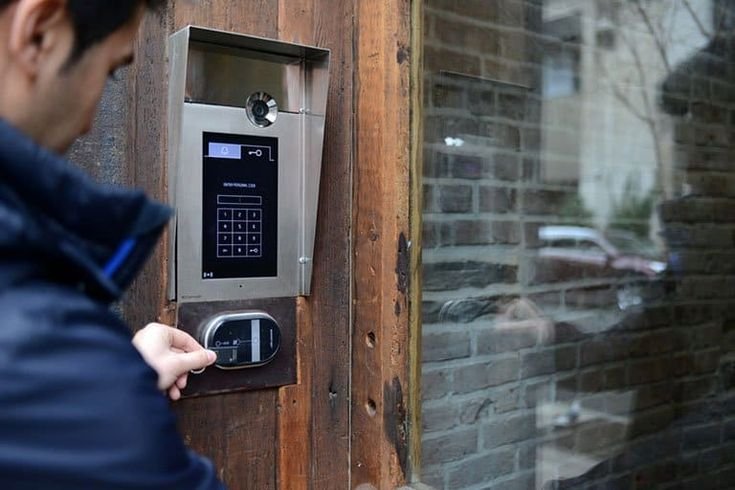
Plan Door Access Control System in Darby, PA for keypads, card readers, mobile access, user permissions, door hardware, logs, and secure entry management.!
Traditional keys can become difficult to manage when several employees, tenants, contractors, or family members need access to the same property. Keys can be misplaced, copied, or remain with people who no longer need entry. Electronic access gives property owners another way to control doors while making user permissions easier to change. Safe Protect Home provides security, surveillance, communication, and access solutions for residential and commercial properties across Pennsylvania.
A useful access-control setup should begin with the way people actually enter the building. Main entrances, employee doors, restricted rooms, storage areas, gated access points, and after-hours entrances can all require different permissions. Property owners should also consider how many users need access, whether temporary entry is common, and how quickly permissions may need to change. Planning those details before equipment is installed can create a simpler system that supports normal daily activity instead of adding unnecessary complexity.
Start With the Doors That Need Better Control
The company’s dedicated Door Access Control System service includes electronic access-control installation, integration with compatible security equipment, user setup, and access-level configuration.
Not every door on a property needs the same type of control. A main office entrance may serve employees and visitors, while a storage room may only need access for a smaller group.
Begin by identifying doors where lost keys, unauthorized entry, or difficult permission management create the most concern.
Commercial properties should also think about staff entrances, management offices, equipment rooms, inventory areas, and other spaces where access should be limited.
A focused plan can reduce unnecessary equipment while giving property managers better control over important entry points.
Compare Keypads, Cards, and Mobile Access
Access-control systems can use different methods to identify authorized users.
Keypads allow users to enter a code. Card or credential systems assign access to individual users, while compatible mobile systems may allow entry through a smartphone.
The best choice depends on the building and the people using it.
A small property may find a keypad simple to manage, while a larger business may prefer individual credentials because users can be added or removed without changing access for everyone else.
Property owners planning access control installation in Darby, PA should consider how frequently users change and whether different groups need different permissions.
Ease of administration can be just as important as the hardware installed at the door.
Avoid Sharing One Code With Everyone
A shared access code may seem convenient, but it becomes harder to manage as more people learn it.
If an employee leaves, a contractor finishes a project, or a tenant changes, property managers may need to change the code for every remaining user.
Individual credentials can make these situations easier to manage when the selected system supports them.
Users can receive only the access they need, and permissions can be removed without affecting everyone else.
Businesses should also avoid informal practices such as writing codes near entrances or sharing credentials between staff members.
Access control is most effective when user permissions remain organized instead of becoming another version of uncontrolled key sharing.
Match Access Levels to Job Responsibilities
Not every employee needs access to every part of a building.
A receptionist may need the main entrance but not an equipment room. Maintenance staff may require access to service areas, while managers may need broader permissions.
Access levels can help organize these differences.
Property owners should decide which doors each group needs during normal operations and whether access should change depending on time or role.
Keeping permissions limited to legitimate needs can make the system easier to review later.
It also prevents administrators from automatically granting full-building access simply because setting up individual permissions seems inconvenient.
A clear user structure should be created during initial configuration and reviewed as staffing or property use changes.
Think About Visitor Entry Separately
Visitors usually need a different access process from employees or residents.
Offices, apartment buildings, gated communities, and multi-tenant properties may need a way to verify visitors before opening a controlled entrance.
Safe Protect Home also provides phone entry and intercom systems, allowing visitor communication to be considered alongside access control where appropriate.
Property managers should decide whether visitors will be met at the door, admitted remotely, given temporary credentials, or managed through another controlled process.
Temporary access should have a clear purpose and end point.
A contractor who needs entry for one project should not automatically retain permanent access after the work is complete.
Check the Physical Door Before Adding Electronics
Electronic access control still depends on the physical door.
A damaged frame, misaligned door, failing closer, or hardware problem can interfere with reliable operation even when the electronic components are working correctly.
Before installation, doors should be checked for smooth opening and closing.
A door that drags on the floor or fails to latch properly should not be expected to improve simply because electronic access hardware is added.
The service page specifically excludes replacement of damaged doors or frames, so those physical repairs may need to be addressed separately.
Treating the door and electronic system as connected parts can help avoid repeated problems after installation.
Plan Wiring Before Finishes Are Complete
Access-control equipment may require wiring between doors, readers, controllers, power supplies, and other system components.
Planning cable routes early can create a cleaner installation, especially during construction or renovation.
Safe Protect Home also provides pre-wiring and structured cabling services for properties that need security infrastructure planned before walls and ceilings are finished.
If a building is being renovated, property owners should identify controlled doors before finish work is completed.
Doing so can reduce the need to work around new surfaces later.
Existing properties can still receive access-control systems, but early coordination is particularly useful when multiple doors or integrated security systems are being installed at the same time.
Integrate Access Control With Other Security Systems Carefully
Access control can work alongside cameras, alarms, intercoms, and other compatible security technology.
For example, surveillance cameras may provide visual information near a controlled entrance, while an intercom can help occupants communicate with visitors before granting access.
Integration should still have a clear purpose.
Adding more technology does not automatically make a property easier to manage. Every connection between systems should support a real operational or security need.
Property owners should understand which systems communicate with each other and what happens if one component loses power or connectivity.
Keeping the design understandable makes future maintenance and troubleshooting easier.
Remove Old Users Promptly
Access permissions should change when people no longer need entry.
Former employees, previous tenants, temporary vendors, or contractors should not remain active simply because nobody reviewed the user list.
Property administrators can build permission reviews into normal staffing or tenant procedures.
When someone leaves, removing their access should become part of the same process as collecting equipment or ending other accounts.
This is one advantage of electronic systems over traditional keys: compatible credentials can often be disabled without replacing every lock.
The benefit only exists, however, when administrators actually maintain the user database.
Keep Door Names and User Records Organized
Clear labeling becomes important as systems grow.
Names such as “Rear Employee Entrance” or “Second-Floor Storage” are easier to understand than generic labels when administrators are reviewing activity or changing permissions.
User names and groups should also follow a consistent structure.
Avoid creating duplicate or unclear entries that make it difficult to determine who still has access.
Documentation can be useful when multiple managers administer the same property.
A well-organized system is easier to update after staff changes, renovations, or the addition of new controlled doors.
Test Entry From Both Sides of the Door
Installation should be followed by complete testing.
Authorized credentials should unlock the intended doors, while unauthorized credentials should remain restricted according to the planned permissions.
The door should also close and secure correctly after each entry.
Exit operation needs attention as well. People inside the building should be able to use required exit routes appropriately without the access system creating confusion.
Testing should include the normal situations users will encounter rather than only confirming that a reader turns on.
If mobile access or another connected feature is included, that functionality should also be configured and tested before the system is considered complete.
Prepare for Changes in Business Hours
Businesses do not always operate on the same schedule forever.
Seasonal hours, weekend operations, new shifts, cleaning crews, and temporary projects can all change who needs access and when.
A property manager should know how the selected system handles these changes.
Permissions should be reviewed before a schedule change instead of waiting until someone is locked out or an old credential continues working when it should not.
Businesses considering commercial access control in King of Prussia, PA can benefit from creating user groups around actual work schedules rather than giving every employee identical access.
This approach can keep the system aligned with normal operations as the business changes.
Plan for Power and System Interruptions
Electronic security systems depend on power and system components to operate correctly.
Property owners should understand how their selected equipment behaves during a power interruption and what procedures should be followed if a component fails.
Emergency and life-safety requirements should never be improvised.
Staff responsible for the property should know who to contact when a controlled door does not respond normally.
Repeated reader failures, delayed unlocking, unusual hardware behavior, or intermittent access should be investigated rather than accepted as normal.
Reliable access control depends on both electronic components and properly functioning door hardware.
Review Permissions as the Property Changes
Access-control needs can change after installation.
A business may add employees, reorganize departments, expand into another floor, or change how storage areas are used. A residential or multi-tenant building may also gain new residents, staff, or service providers.
The user list and door permissions should evolve with those changes.
Regular reviews can identify credentials that are no longer needed and access levels that are broader than necessary.
Safe Protect Home provides ongoing technical support for its security services, making maintenance and system updates part of the longer-term security plan rather than a one-time installation task.
Conclusion
Door Access Control System installation can reduce dependence on traditional keys while giving property owners more flexibility over who can enter specific areas. Strong results depend on more than installing a reader at the door. User permissions, physical door condition, wiring, credential type, visitor procedures, integration, testing, and ongoing administration all matter.
In Darby, homeowners and businesses can begin by identifying the entrances where key management or unauthorized access creates the greatest concern. In King of Prussia, commercial property managers can use the same approach to organize staff permissions, restricted rooms, visitor access, and changing work schedules.
Safe Protect Home provides access-control systems alongside CCTV, alarms, intercoms, and cabling services. Keeping users organized and reviewing permissions when property needs change can help the system remain practical after the initial installation.
Frequently Asked Questions
What does a Door Access Control System do?
It manages who can enter selected doors using electronic credentials such as keypads, cards, compatible mobile devices, or other supported access methods.
Can different employees have different access permissions?
Yes. Compatible access-control systems can be configured with different users and access levels so employees only receive entry to appropriate doors.
Can access control work with an existing security system?
The company’s service includes integration with compatible existing security systems and doors. The exact options depend on the equipment already installed.
What happens when an employee leaves the company?
Their electronic credential or user access should be removed promptly. This can prevent former users from retaining entry without requiring every active employee to receive a new physical key.
Can access control be used with an intercom?
Compatible systems can be coordinated so visitors communicate through an intercom while authorized occupants manage entry. The final setup depends on the property and equipment selected.
Does installing access control repair a damaged door?
No. Electronic access equipment does not correct damaged frames, poorly aligned doors, or other physical door problems. Those issues should be addressed so the access hardware can operate correctly.